Programming
The Piccolo has an application programming interface (API).
The API uses CherryPy.
Bitbucket
This section is optional.
The Bitbucket web site is used to manage the open source Piccolo code. The Piccolo software is written entirely in the Python programming language. The Python modules which control and operate the Piccolo are open source. The hardware drivers for USB spectrometers, radios and shutters are closed source.
As the Piccolo is distributed with open source software users may wish to modify or customize the included software to suit their own applications. Bitbucket is a web site that maintains a copy of the Piccolo source code and tracks any changes users’ make to the code. It enables users who wish to to share their changes to the Piccolo source code, or additional software they have written, with other users. It is though not essential to use Bitbucket in order to operate or program the Piccolo.
Version control software is required to use Bitbucket. The software synchronizes a copy of the Piccolo source code on a computer with the Bitbucket server. Mercurial (abbreviated hg after the chemical symbol for mercury) is the version control system used for the Piccolo. To copy code changes to the Piccolo server it must be installed on the computer. It can also be installed on the Raspberry Pi, if the Pi has a network connection. For instructions on installing Mercurial on the Raspberry Pi see the Install Mercurial section of the installation guide.
A Bitbucket account is required.
To commit a change to Bitbucket type:
hg commit -u "Iain Robinson <iain@physics.org>"
replacing Iain Robinson <iain@physics.org> with the name and email address used in your Bitbucket account.
This will open a text editor such as Windows Notepad or nano. Enter a commit message that describes the changes.
Attention
Ensure your name and email address in above commit command are identical to those used for your Bitbucket account.
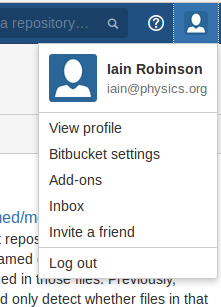
The name and email address are used by Bitbucket to connect the commit message with the user account. To find out your usename and email address log into Bitbucket and click the user icon as shown below.
Hint
You edit your Mercurial settings file (.hgrc) to include your name, email address, default text editor and other settings.
Updating Piccolo Server
To clone the Piccolo repository:
hg clone https://yourusername@bitbucket.org/teampiccolo/piccolo
replacing yourusername with the username of your Bitbucket account.
To update a cloned repository:
hg pull
hg update
To install (or update) Piccolo Server:
cd piccolo/Source/Server
sudo python setup.py install
Spectrometers
Spectrometers have a name that is based on their serial numbers.
Channels
The Piccolo is a dual-field-of-view spectrometer system and therefore has two (or possibly more) light inputs. These are referred to as channels and in most configurations there are two channels defined:
- upwelling
- downwelling
Channel names may be case sensitive.
Dispatcher
The dispatcher is a Python object (class name PiccoloDispatcher) that receives instructions from the laptop or other sources and passes them on the instruments. There can only be one dispatcher running at any one time. It is possible to run the dispatcher in a background thread.
A class diagram for PiccoloDispatcher is shown below. As PiccoloDispatcher is designed to be run in the background as a separate thread, it inherits from Python’s built-in Thread class from the threading module.

The dispatcher by itself does not handle any hardware. Instead a number of components must be registered with it before they can be used. In principle any components can be registered with the dispatcher. Below is an example of the:
- An upwelling shutter
- A downwelling shutter
- An Ocean Optics USB2000+ spectrometer
- The Piccolo Component
- The Controller
Controller
The controller contains:
- The data directory
- shutters
- spectrometers
The interface to the data directory is provided by an object of class PiccoloDataDir.
The controller receives instructions and puts them into a queue.
A subclass of PiccoloController is PiccoloControllerCherryPy which provides an interface for Remote Procedure Calls (RPC) written in Javascript Object Notation (JSON). This provides a web-like API for the Piccolo.
Scheduler
In logging applications it is required to acquire data at defined times. The scheduler provides an object to do this. Items (jobs) can be added to the scheduler with a specified start time.
Starting the server
Starting Piccolo Server goes through the following setup steps:
- Reads the server configuration file.
- Sets up a log file.
- Creates the data directory.
- Initializes (but doesn’t start) the dispatcher.
- Reads the instrument configuration file.
- Initializes the shutters.
- Registers the shutters with the dispatcher.
- Finds and initializes all (USB-connected) spectrometers, then registers them with the dispatcher.
- Sets up the Piccolo Component and registers it with the dispatcher.
- Initializes the controller and registers it with the dispatcher.
- Starts the dispatcher.
- Starts the CherryPy server with the conroller.